
Download RAM Def – RAM defragmentation, memory optimization, system performance, utility tool, Windows app
Overview
RAM Def is a utility tool designed for Windows users seeking to maintain optimal system performance through memory optimization. The app focuses on defragmenting RAM, a process intended to reduce memory fragmentation and improve responsiveness. By addressing potential performance bottlenecks caused by inefficient memory allocation, RAM Def aims to deliver smoother multitasking, faster application loading, and a more stable computing experience. The tool is particularly suited for users who prioritize system efficiency and are looking for a dedicated solution to manage memory resources.
Target users include general desktop users, power users, and system administrators who manage multiple applications simultaneously. While the app is positioned as a performance-enhancing utility, it operates within the constraints of the Windows ecosystem. The developer, VSTEf research & development, is listed as the creator, though no further details about the company’s background or track record are available. The app was released on May 14, 2024, indicating it is a relatively new addition to the utilities category.
Real-world use cases may include users experiencing sluggish performance during intensive workflows such as video editing, software development, or running multiple virtual machines. In such scenarios, maintaining clean memory allocation could theoretically contribute to improved system responsiveness. RAM Def fits into the broader ecosystem of system maintenance tools, offering a niche solution focused specifically on RAM management, a function not commonly addressed by standard operating system utilities.
Key Features & Functionality
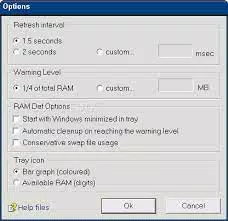
- Automatic Defragmentation – RAM Def can initiate defragmentation when memory fragmentation reaches a predefined threshold. This feature aims to prevent performance degradation by proactively optimizing memory allocation, ensuring the system remains responsive during prolonged usage.
- Silent Operation via Command-Line Parameters – For users who prefer minimal system interference, the app supports background execution without visible interface elements. This allows for unobtrusive memory optimization, ideal for automated tasks or scheduled maintenance.
- Advanced Optimization Algorithms – The app leverages internal algorithms designed to process and reorganize memory segments efficiently. These algorithms are intended to reduce fragmentation and improve access speed, contributing to overall system stability.
- System Performance Enhancement – By defragmenting RAM, the tool aims to reduce latency in application launches and improve multitasking capabilities. Users may notice faster switching between programs and reduced lag during high-memory-demand operations.
- Comprehensive Support Resources – The developer provides documentation, troubleshooting guides, and online assistance to help users navigate setup and usage. This support infrastructure supports user confidence and long-term usability.
These features are structured around a single core purpose: memory optimization. For example, a user running a large software suite with persistent background processes could benefit from periodic RAM defragmentation to maintain consistent performance. The silent mode is especially useful in environments where system interruptions must be avoided, such as during presentations or automated workflows.
Interface, UX & Performance
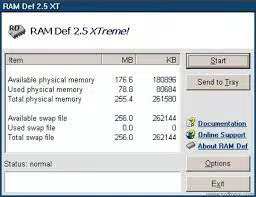
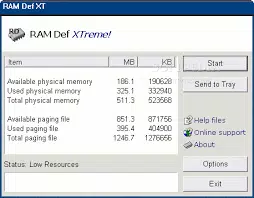
RAM Def presents a minimal interface, consistent with its utility-focused design. The user experience is streamlined, emphasizing functionality over visual complexity. Navigation is straightforward, with essential controls accessible through a simple dashboard or command-line interface. The layout prioritizes clarity, allowing users to monitor system status and initiate operations with minimal effort.
Visual style is utilitarian, relying on clean lines and functional color cues to indicate system health or operational status. The absence of elaborate graphics or animations aligns with the app’s performance-oriented philosophy. Users can expect a lightweight interaction model, with quick response times to commands and minimal resource consumption during operation.
Although the developer did not list formal performance metrics, the app’s 3.2 MB file size suggests a low footprint. This indicates efficient code execution and reduced impact on system resources. Responsiveness appears to be optimized for typical desktop environments, with operations completing in a timely manner. Stability is implied through the inclusion of silent mode and support resources, though real-world reliability data was not provided.
Platform Compatibility & Technical Requirements
RAM Def is designed exclusively for the Windows platform. It is compatible with Windows operating systems, though specific version requirements were not disclosed. The app’s file size is 3.2 MB, which is compact and suitable for systems with limited storage capacity.
The developer did not specify minimum OS requirements or hardware prerequisites. As such, compatibility with older or newer Windows versions cannot be confirmed. Users should verify system compatibility before installation, especially in enterprise or legacy environments. The app is available at no cost, making it accessible to a broad audience.
Pros and Cons
- Lightweight design with minimal system impact
- Automatic defragmentation at user-defined thresholds
- Supports silent operation via command-line interface
- Free to download and use
- Includes documentation and troubleshooting resources
- Specific OS compatibility details were not provided
- No public performance benchmarks or user feedback available
- Functionality limited to RAM defragmentation without broader system optimization
- Developer background and reputation not publicly documented
- No visible update history or changelog included
FAQ
Is RAM Def safe to use on my Windows system?
Yes, RAM Def is designed to operate within the Windows environment. However, as with any system-level utility, users should ensure they are running the latest version and verify the source before installation.
Can I run RAM Def without a visible interface?
Yes, the app supports silent operation using command-line parameters, allowing it to run in the background without displaying any user interface elements.
Does RAM Def require administrator privileges?
The developer did not specify whether elevated permissions are required. Users should test the app in their environment to determine if administrative rights are needed.
How often should I run RAM Def?
Since the app supports automatic defragmentation based on user-defined thresholds, the frequency depends on individual usage patterns and system load.
Is RAM Def compatible with all Windows versions?
Compatibility information was not fully disclosed. While the app is designed for Windows, specific OS version support was not listed.
Final Thoughts
RAM Def presents a focused solution for users seeking to optimize their system’s memory performance. Its lightweight design, automatic defragmentation, and silent operation make it a practical tool for maintaining system responsiveness. While the lack of detailed compatibility and performance data limits deeper evaluation, the app’s core functionality is clear and purpose-built.
It is particularly valuable for users who manage memory-intensive workflows and want a dedicated utility to complement standard system maintenance. The free availability further enhances its accessibility. For those looking to explore memory optimization on Windows, RAM Def offers a straightforward, no-cost entry point.
Download RAM Def now


